![spl-siana-imagotype-color.svg]](https://help.spalopia.app/hubfs/spl-siana-imagotype-color.svg)
If you offer gift vouchers with multiple sessions and work with the Agenda module, it is important to schedule each session using the voucher amount, not the service’s standard price.
👉 How to configure a voucher with multiple sessions?
To do this correctly, you can choose one of the following options, depending on your internal workflow.
Option 1. Create an internal service exclusively for voucher redemption
You can configure a specific service intended only for scheduling sessions derived from a gift voucher.
👉 How to create or edit treatments in the back office?
💬 For example: “Voucher Redemption – 10 Sessions | Spa Circuit”
💡 Tip: Configure it as an internal-use service, so it is only visible in the Agenda and cannot be booked through the Booking Engine.
Option 2. Add an internal rate to the original service
You can keep the original service and create an internal rate specifically for voucher redemptions.
👉 How to add rates?
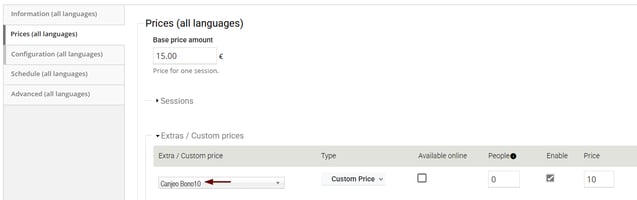
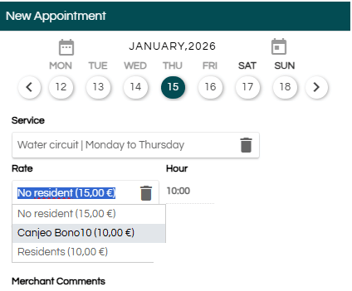
💡 Tip: Configure this rate so it is available only from the Agenda and not visible to customers during online sales.
Rate configuration:
Rate display in the Agenda:
What should you do when the customer arrives for their appointment?
When the customer arrives at the centre, simply carry out the partial redemption of the gift voucher corresponding to that session.
Depending on the modules you have contracted, you can complete this step by following the relevant manual:
👉 How to redeem a gift voucher? | Module: Booking Engine
👉 How to redeem a gift voucher? | Module: Point of Sale
💡 Tip: When scheduling the appointment, add the voucher reference in the Seller comments field. This will make verification easier when the customer arrives.
📩 If you have any questions during the process, please write to soporte@spalopia.com