![spl-siana-imagotype-color.svg]](https://help.spalopia.app/hubfs/spl-siana-imagotype-color.svg)
💡In this article, you will find information about:
- What is a booking request?
- What is the difference between a booking request and an instant booking?
- How can you distinguish a booking request from an instant booking in your Booking Engine?
- How is the customer notified about their booking request?
- What does the Spa need to do when receiving a booking request?
- Which cancellation policy applies to booking requests?
- How and when does the customer pay for the booking?
- What should the centre do on the day of the appointment?
What is a booking request?
A booking request is a request made by a customer to book a service at your centre for a specific date and time.
It works as a request form, meaning that the centre is not obliged to accept it.
What is the difference between a booking request and an instant booking?
If you use our Calendar and Booking Engine, the availability shown to the customer will always be accurate, as it is updated in real time from the Calendar. In addition, when a customer makes an instant booking through the Booking Engine, it is automatically added to your Calendar and confirmed immediately.
With a booking request, however, the customer selects the date and time they would like to visit the centre, but they will not receive an immediate confirmation. Once the centre receives the request, it can: accept it, suggest an alternative date, or cancel it if there is no availability.
If you use our Calendar, once the booking is confirmed, it will automatically appear in the corresponding column.
How can you distinguish a booking request from an instant booking in your Booking Engine?
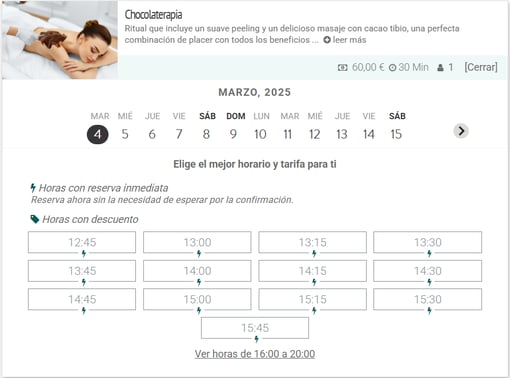
When a customer clicks the “Book” button, a calendar will appear where they can select the desired date and time for their treatment.
If the time slots display the symbol ( ) it means it is an instant booking, as shown below:
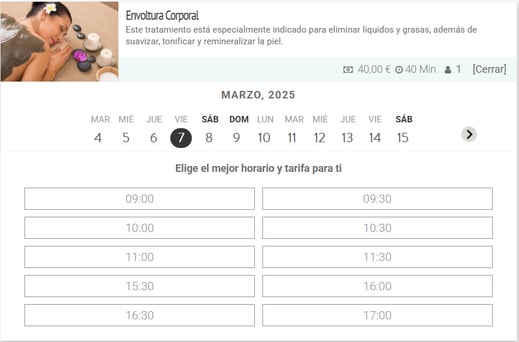
the booking request will display the following button:

When clicking on it, the calendar will not display the characteristic instant booking icon ():
How is the customer notified about their booking request?
The customer who submits a booking request will receive an email with the subject: “Booking pending confirmation”, including all the booking details.
The following text will also be included:
"This booking request will be sent to the spa. You will receive an email in response if it is confirmed or if the spa proposes an alternative date. If the spa does not respond within X hours*, the booking request will be automatically cancelled."
* This time period can be configured.
The customer simply needs to wait for your response.
What does the Spa need to do when receiving a booking request?
The Spa will also receive an email with the subject: “A customer has submitted a booking request”.
You should then review availability in your calendar and decide whether you want to accept the booking.
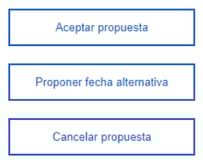
In the email, you will see three possible actions:
-
Accept proposal
If you accept the customer’s booking request, the booking will be officially confirmed. The customer will be notified automatically.
-
Suggest an alternative date
If you are unable to attend the customer on the selected date, you can suggest an alternative date from the Calendar, which will be automatically sent by email. The customer may accept or reject it.
💡 How to modify an appointment?
-
Cancel proposal
You can also cancel the booking request. The customer will be notified automatically.
By clicking on any of these options (make sure you are logged in), you will be taken to the booking confirmation page (Listings > Appointments), where you will again see the available options at the top.
⚠️ If you do not take any of the actions above, the booking request will be automatically cancelled after X hours*.
* This time period can be configured.
Which cancellation policy applies to booking requests?
Once the booking has been confirmed by the centre (or the counterproposal has been accepted by the customer), the standard cancellation policy will apply.
By default, these cancellation fees are the ones provided during the onboarding process. If you wish to review or modify them, please contact soporte@spalopia.com and provide the new conditions.
How and when does the customer pay for the booking?
You can choose between three configuration options:
Stripe with prepayment
The customer will enter their card details to complete the booking (the details will be securely stored on the Stripe platform), but the payment will only be processed once the Spa confirms the booking.
If a counterproposal is made, the payment will be processed once the customer accepts it.
💡 Booking request | Stripe with prepayment
Stripe without prepayment
The customer will enter their card details to complete the booking (the details will be securely stored on the Stripe platform), but payment will be made upon arrival at the spa. In the event of a no-show, you will be able to access the back office and manually charge the customer.
💡 Booking request | Stripe without prepayment
No payment method
The customer will complete the booking process without entering card details, so payment must be made upon arrival at the spa.
💡 💡 Booking request | No payment method
What should the centre do on the day of the appointment?
On the day of the appointment, the check-in option will become available, and it can be completed either from the Calendar or from Listings > Appointments.
💡 How to perform the check-in for an appointment?
If you have any questions during the process, please do not hesitate to contact us at soporte@spalopia.com.