![spl-siana-imagotype-color.svg]](https://help.spalopia.app/hubfs/spl-siana-imagotype-color.svg)
You can activate a promotion for any treatment or package directly from its configuration. The promotion will be automatically applied in the Agenda and/or the Booking Engine according to the conditions you define.
Steps to create a promotion
1. Access the treatment or package
-
Go to Manage > Treatments or Manage > Packs.
-
Locate the service you want to apply the promotion to.
-
Clic Edit.
2. Access the promotions section
-
Within the service, go to Prices > Offers
-
Click Add offer and configure the following fields:
- Start date/End date
Define the date range during which the promotion will be active. - Start time/End time
Specify the exact time range in which the discount will apply. - Days of the week
Select the days on which the promotion will be valid within the configured period.
💬 For example: a promotion active throughout September, except Saturdays.
📌 Note: The promotion will automatically activate and deactivate based on this configuration.
- Discount type
- Fixed on sale date
Applies a fixed discount amount (€) to the base price, as long as the purchase is made within the configured period.
🔍 How it works: Valid for bookings and gift vouchers.
💬For example: Purchases made between 3 and 16 February receive a €20 discount.
- Fixed on sale date
- Start date/End date
-
-
- Percent on sale date
Applies a percentage discount to the base price during the configured period.
🔍 How it works: Valid for bookings and gift vouchers.
💬 For example: Purchases made between 3 and 16 February receive a 10% discount.
- Percent on sale date
-
-
-
- Percent on booking date
The discount is applied only to bookings enjoyed on the configured days and time slots.
🔍 How it works: Not available for gift vouchers.
💬 For example: Bookings enjoyed between 15 and 31 May, from 10:00 to 13:59, will receive a 10% discount..
- Percent on booking date
-
✋ Important: Always remember to SAVE the changes before leaving.
How is the promotion displayed in the Booking Engine?
- Fixed or percent on sale date
During the active period, the Booking Engine will highlight the service and automatically apply the discounted price.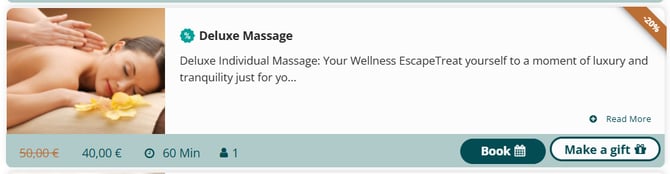
- Percent on booking date
On days and time slots with a discount, the service calendar will display the “discounted hours” label.
Outside those hours, the price will be shown without the promotion applied.
💬 For example: This service has a discount for bookings enjoyed between 9:00 and 11:00. Outside this time range, the promotion label is no longer displayed.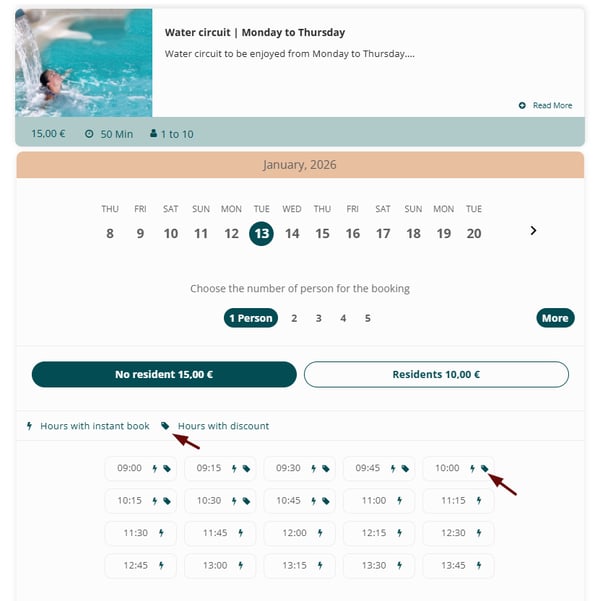
📩 If you have any questions during the process, please write to soporte@spalopia.com